Appearance
Golang 学习手册
Go语言(或 Golang)起源于 2007 年,并在 2009 年正式对外发布。Go 是非常年轻的一门语言,它的主要目标是“兼具 Python 等动态语言的开发速度和 C/C++ 等编译型语言的性能与安全性”。
Go语言是编程语言设计的又一次尝试,是对类C语言的重大改进,它不但能让你访问底层操作系统,还提供了强大的网络编程和并发编程支持。Go语言的用途众多,可以进行网络编程、系统编程、并发编程、分布式编程。
从基本 Golang 基本语法一步步, 进行学习. 然后实现 server api 的一个项目.
学习路线
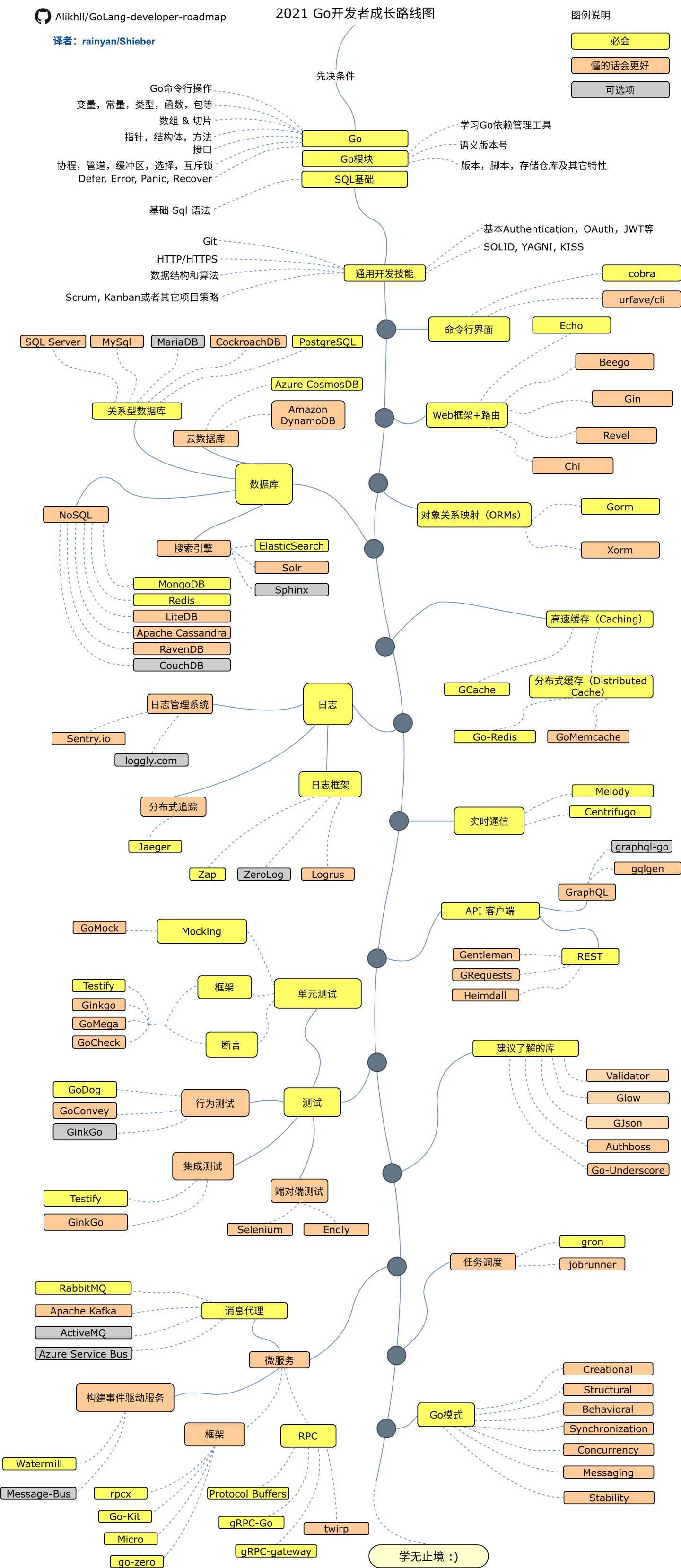
安装Golang
ubuntu22.02 go-1.22
通过 apt install golang 默认是 1.18版本, 如果想要安装更新的版本, 需要手动安装, 现在最新的版本是 1.23, 但现在项目用到的是 1.22. 所以, 需要手动安装一下. 步骤如下. 安装 1.23 版本也基本差不多
go 官网下载网址 可以找到最新的版本.
我们找到需要安装的版本, 下载到安装机器上.
sh
$ wget golang.google.cn/dl/go1.22.2.linux-amd64.tar.gz解压到 /usr/local 目录下:
sh
sudo tar -C /usr/local -xzf go1.22.2.linux-amd64.tar.gz设置环境变量, 编辑 ~/.bashrc 文件, 加入下面一行:
sh
export GOROOT=/usr/local/go
export GOPATH=$HOME/go
export PATH=$GOPATH/bin:$GOROOT/bin:$PATH
--------------
or
--------------
if [ -f /usr/local/go ];then
    export GOROOT=/usr/local/go
	export GOPATH=$HOME/bin
	export PATH=$PATH:$GOROOT/bin:$GOPATH/bin
fi使环境变量生效:
sh
source ~/.bashrc验证安装成功:
sh
$ go version
go version go1.22.2 darwin/amd64snapd install go
sh
$ sudo apt update
$ sudo apt install snapd

// 安装到最新的 golang 的版本
$ sudo snap install go --classic第一个Go程序
创建一个名为 hello.go 的文件, 内容如下:
go
package main

import "fmt"

func main() {
    fmt.Println("Hello, world!")
}保存文件, 然后运行:
sh
$ go run hello.go
Hello, world!VScode golang的插件
Go 基本语法
变量、数据类型和常量是编程中最常见,也是很好理解的概念。本章将从 Go 语言的变量开始,逐步介绍各种数据类型及常量。
Go 语言在很多特性上和C语言非常相近。如果读者有C语言基础,那么本章的内容阅读起来将会非常轻松;如果读者没有C语言基础也没关系,因为本章内容非常简单易懂。
GO 命令行操作
安装完成 golang 语言编译环境, 那我们先运行一下, 看看它会有一些什么选项.
sh
$ go命令运行结果:
sh
Go is a tool for managing Go source code.

Usage:

	go <command> [arguments]

The commands are:

	bug         start a bug report
	build       compile packages and dependencies
	clean       remove object files and cached files
	doc         show documentation for package or symbol
	env         print Go environment information
	fix         update packages to use new APIs
	fmt         gofmt (reformat) package sources
	generate    generate Go files by processing source
	get         add dependencies to current module and install them
	install     compile and install packages and dependencies
	list        list packages or modules
	mod         module maintenance
	work        workspace maintenance
	run         compile and run Go program
	test        test packages
	tool        run specified go tool
	version     print Go version
	vet         report likely mistakes in packages

Use "go help <command>" for more information about a command.

Additional help topics:

	buildconstraint build constraints
	buildmode       build modes
	c               calling between Go and C
	cache           build and test caching
	environment     environment variables
	filetype        file types
	go.mod          the go.mod file
	gopath          GOPATH environment variable
	gopath-get      legacy GOPATH go get
	goproxy         module proxy protocol
	importpath      import path syntax
	modules         modules, module versions, and more
	module-get      module-aware go get
	module-auth     module authentication using go.sum
	packages        package lists and patterns
	private         configuration for downloading non-public code
	testflag        testing flags
	testfunc        testing functions
	vcs             controlling version control with GOVCS

Use "go help <topic>" for more information about that topic.变量
String
Number
Booler
Float
常量
类型
函数
包
数组和切片
指针
结构体
方法
接口
协程
管道
缓冲区
选择
互斥锁
Defer
Error
Panic
Recover
Go model
Golang 语言自带的 model 管理的使用
依赖管理工具
语义版本号
版本,脚本, 存储仓库及期它特性
环境变量配置
sh
$go env命令运行结果:
sh
GO111MODULE="on"
GOARCH="arm64"
GOBIN=""
GOCACHE="/Users/richard/Library/Caches/go-build"
GOENV="/Users/richard/Library/Application Support/go/env"
GOEXE=""
GOEXPERIMENT=""
GOFLAGS=""
GOHOSTARCH="arm64"
GOHOSTOS="darwin"
GOINSECURE=""
GOMODCACHE="/Users/richard/go/pkg/mod"
GONOPROXY=""
GONOSUMDB=""
GOOS="darwin"
GOPATH="/Users/richard/go"
GOPRIVATE=""
GOPROXY="https://goproxy.cn,direct"
GOROOT="/opt/homebrew/Cellar/go/1.20.6/libexec"
GOSUMDB="sum.golang.org"
GOTMPDIR=""
GOTOOLDIR="/opt/homebrew/Cellar/go/1.20.6/libexec/pkg/tool/darwin_arm64"
GOVCS=""
GOVERSION="go1.20.6"
GCCGO="gccgo"
AR="ar"
CC="cc"
CXX="c++"
CGO_ENABLED="0"
GOMOD="/dev/null"
GOWORK=""
CGO_CFLAGS="-O2 -g"
CGO_CPPFLAGS=""
CGO_CXXFLAGS="-O2 -g"
CGO_FFLAGS="-O2 -g"
CGO_LDFLAGS="-O2 -g"
PKG_CONFIG="pkg-config"
GOGCCFLAGS="-fPIC -arch arm64 -fno-caret-diagnostics -Qunused-arguments -fmessage-length=0 -fdebug-prefix-map=/var/folders/0q/k680qvfj7159_nvw7jkh294r0000gn/T/go-build607874643=/tmp/go-build -gno-record-gcc-switches -fno-common"通用开发技能
常用的基本算法的实现.
基本Authentication
OAuth
JWT
SOLID
YAGNI
KISS
GIT基本操作
HTTP/HTTPS原理
数据结构和算法
链表
二叉树
排序
状态机
Golang语言相关的库
常用的库
命令行界面
cobra
web框架+路由
Echo
Gin
数据库
Gorm
搜索引擎 ElasticSearch
高速缓存
Gcache
健在式缓存 Go-Redis
日志框架
分布式追踪 jaeger
zap
消息代理
RabbitMQ
微服务
微服务框架
Go-Kit
Micro
go-zero
RPC
Prototcol Buffers
gRPC-GO
构建事件驱动服务
watermill
实时通信
Melody
Centrifugo
API服务
REST
GraphQL graphql-go
任务调度
gron
Go模式
Creational
Structural
Behavioral
Synchroniza
Concurrency
Messageing
Stabili
单元测试
GoMock
Testify
断言
GoDog
mysql
常用的 sql 语言讲解.